How to Make Your Home Smarter: Automated Doors and Smart Home Integration with Apple HomeKit, Google Assistant, and Alexa
Welcome to the house of the future
Think about how hot it is when you get home from work. The door opened as the automobile got closer to the garage. You don't have to look for the button on the remote. Or think about how you brought a market full of hands and just one voice command unlocked your door. You might be at work and suddenly wonder, "Did I close the garage door?" You can check it with just one click on your smartphone.
It's not a movie about space. This is how things are today. Smart home technology has made our homes smarter, safer, and more convenient than ever before. Your automatic garage door is one of the most critical aspects of this smart home ecosystem.
In this detailed blog post, we'll talk about how to link your automatic door to three of the top smart home systems in the world: Apple HomeKit, Google Assistant, and Amazon Alexa. We will look at its pros and cons, the equipment needed, the step-by-step process for integrating it, and any security issues that may come up. This article will help you make your home a real smart home.
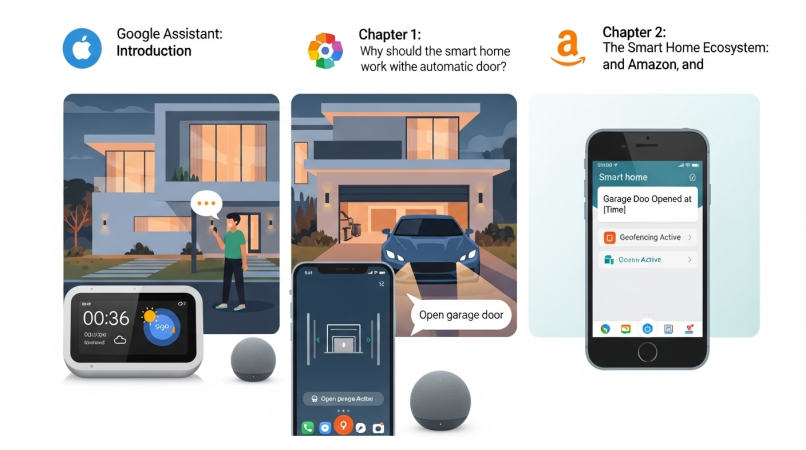
- Chapter 1: Why should the smart home system work with the automatic door?
- Chapter 2: The Smart Home Ecosystem: Apple, Google, and Amazon
- Chapter 3: What do you require? (The Toolkit You Need)
- Chapter 4: The Guide in Steps
- Chapter 5: Best Practices, Security, and Privacy
- Conclusion: The key to live a sensible life
Chapter 1: Why should the smart home system work with the automatic door?
A basic automatic door that you can manage from afar is really useful. But when you add it to a whole smart home system, it becomes much more helpful and functional. Let's look at the most important reasons.
The best thing about smart integration is how easy it is to use.
- Voice control: You may use simple voice commands like "Hey Google, open the garage door" or "Siri, close the garage." This function will be quite helpful when your hands are full or when you're in the car.
- Geofencing is a nice thing. Your smartphone knows where you are, and when you get close enough, the garage door opens by itself. The same thing happens when you leave the house: it closes on its own. You don't have to open or close the door.
- You can open, close, and see the current state of a door from anywhere in the globe using your smartphone's app. You can also open the door remotely if you need to let a delivery person, family member, or friend in for a short time.
Better security: A smart garage door makes your home safer than ever before.
- Notification in real time: Your phone will get a message every time your garage door opens or closes. You will notice right away if the door opens at an unexpected time.
- Access log: The app keeps a full record of who opened or closed the door and when. It lets you control anything in your home.
- Integration with Security Cameras: The garage camera can work with a lot of smart systems. The camera may start recording and offer you a live feed whenever the door opens.
- There is no chance of losing the remote. A physical remote is a big security concern if it is lost or stolen. You may effortlessly stop any device from accessing smart systems via the app.
"Have I closed the door?" is a common thinking in our daily lives. Smart integration takes this worry away.
- Status Check: You may look at your door on the app at any time and from any place.
- You can select a specified time for the auto-close timer. It will close on its own if the door is open for longer than that. You can, for instance, programme the door to close on its own every ten minutes after it opens.
- Guest access: You can provide a guest or service provider temporary or temporary access to your house if they are scheduled to come. They won't have to enter anything anymore, and their access will be instantly taken away when they leave.
Smart home technology is changing quickly, so you should make sure your home is ready for the future. Getting your home ready for the future entails connecting it to modern technology. A system that works together makes your home more valuable, modern, and appealing. Your garage door will be an important component of that ecosystem when you add other smart devices, including lighting, thermostats, and locks, in the future.
Chapter 2: The Smart Home Ecosystem: Apple, Google, and Amazon
You need to pick a smart home platform before you can make your automatic door smarter. Google Assistant, Amazon Alexa, and Apple HomeKit are the three primary competitors in the market right now. Let's learn more about each of them.
Google Assistant
Google Assistant is Google's voice assistant. You may use it on Android phones, Google Nest speakers (such the Nest Mini and Nest Hub), and many other devices made by other companies.
- You say "Hey Google" or "OK Google" to start your command. Google Assistant listens to your voice, processes it on the cloud, and provides instructions to the device that is connected.
- The key benefits are: Availability: Most Android phones already have it.
- Strong integration: Google has made the Assistant work very well with its search engine and other services like Google Maps and Calendar.
- Works with a lot of devices: Google Assistant works with millions of smart devices from thousands of brands.
- You may make routines using garage doors. For instance, saying "Hey Google, good night" will turn off the lights in your bedroom, change the temperature, and check to see if the garage door is closed.
- Security: Google lets you create a voice PIN or passcode for critical operations like opening your garage door. This way, anyone who shouldn't be able to open your door can't just yell from outside.
Amazon Alexa
Amazon's speech assistant, Alexa, is best known for its Echo smart speakers and display devices.
- You say "Alexa" to start your command. Alexa uses a number of "skills" to talk to other devices. You need to turn on the skill for each smart device in the Alexa app.
- The key benefits are: Alexa has a huge library of skills, which makes it quite useful.
- Popularity and devices: Echo devices are quite popular and come in a wide range of prices.
- Alexa's routine feature is quite useful for making routines. You can do more than one thing at a time based on a command or a certain time. For instance, Alexa will tell you the weather, play your favourite music, and unlock the garage door at 7 a.m.
- To use Alexa to manage your garage door, you first need to enable the skill for the brand you have (such MyQ or Genie Aladdin) and link your account.
- Alexa, like Google, also suggests setting a 4-digit voice code to unlock the door.
Apple HomeKit and Siri
Apple's smart home system is called Apple HomeKit and Siri. It is very much a component of their operating systems (iOS, macOS, watchOS) and puts a lot of stress on privacy and safety.
- You can use Siri on your iPhone, iPad, Apple Watch, or HomePod speaker to give orders. You need a Home Hub for the HomeKit. This can be a HomePod, HomePod Mini, or Apple TV. The hub lets you control your gadgets even while you're not home.
- The key benefits are: HomeKit has great security and privacy since it uses end-to-end encryption. Your device keeps all of your data safe, and it doesn't go to Apple's servers. It is the greatest solution for anyone who care about their privacy.
- Seamless Integration: If you utilise Apple products, HomeKit will work perfectly with the ones you already have.
- Scenes and automation: You can make different scenes. If you switch on the "I'm Home" scene, for instance, the garage door will open, the lights in the house will come on, and the air conditioning will turn on.
- Use for garage doors: Inside the box of HomeKit-compatible gadgets is a specific QR code. You only need to scan the code in the Apple Home app, and the gadget will connect on its own.
And which one is best for you?
- Google Assistant is the best choice for you if you use Google's services a lot and have an Android phone.
- Alexa is an excellent choice if you want an Echo device and are shopping on Amazon.
- HomeKit is the greatest and most secure platform for you if you care about privacy and are already using Apple products.
Chapter 3: What do you require? (The Toolkit You Need)
To make your automatic door intelligent, you'll need some hardware and software. Let's look at the list.
An automatic door opener that works with it
- Wi-Fi-enabled garage door openers: Many new garage door openers, such LiftMaster, Chamberlain, and Genie, now come with built-in Wi-Fi. You may connect these openers directly to your home network, and they integrate with smart home systems. The box or description should have a logo that says "Works with Google Assistant," "Works with Alexa," or "Works with Apple HomeKit."
- Add-on gadget to make the current opener smarter: You don't have to replace the complete system if you already have a good automatic door opener. You can buy a "smart hub" or "bridge" gadget to make it smart.
- Some examples are the Chamberlain MyQ Smart Garage Hub, the Genie Aladdin Connect, and the Tailwind iQ3.
- How it works: These hubs have two pieces. One part goes on the ceiling of your garage next to your current opener. It connects to the opener with a cable. The other part is a sensor that goes on the garage door. The hub knows if the door is open or closed thanks to this sensor. The hub connects to your home's Wi-Fi network and lets your smartphone app and smart speaker talk to each other.
To get a strong and steady Wi-Fi signal in your garage, you need to have a solid Wi-Fi connection.
The garage is far distant from the main router in the house, thus the signal may not always be strong. If that's the case, you might want to use a Wi-Fi extender or mesh network system to increase the signal. A bad connection might cause difficulties like commands not working or the device being offline.
For simple setup, configuration, and remote control, you'll need an iOS or Android phone.
You will need to install both the software from the manufacturer (such the MyQ app) and the app for the smart home platform you want to use (Google Home, Amazon Alexa, or Apple Home).
A Smart Speaker or Home Hub
You can only manage the door with a smartphone app, but to really take advantage of voice commands, you'll need a smart speaker or hub.
- Google Assistant works with any Google Assistant-enabled speaker, including the Google Nest Mini or Nest Hub.
- For Alexa, you can use an Amazon Echo Dot, Echo Show, or any other device that works with Alexa.
- You need a HomePod, HomePod Mini, or Apple TV (4th generation or newer) to use Apple HomeKit as your home hub.
Chapter 4: The Guide in Steps
Now we get to the most crucial part: the process of integration. We will explain how to do it on each platform separately. If you've followed the hardware instructions and linked your smart garage door opener or hub to your Wi-Fi network, you should be good to go.
Step 1: Link up with the Google Assistant
- Set up the app from the manufacturer: on start, download the app for your garage door opener from the manufacturer (for example, Chamberlain MyQ) on your phone. Follow the steps in the app to make an account and add your device. Check that you can open and close the door using the app.
- Use your phone to open the Google Home app.
- To add a device, tap the "+" (Add) symbol in the upper left corner of the app. Then choose "Settings."
- Choose "Works with Google" or "Have something already set up?" on the next screen.
- Find your brand: There is a long list here. You may find and choose your garage door opener by typing its brand name (like MyQ) into the search field.
- Link Account: Now you will be sent to the login page for your brand. Use the username and password you made in Step 1 to log in. Let Google take charge of your smartphone.
- Assign device: Once the connection is made, Google Home will find your device. You put the device in a specified "home" and "room," like the garage.
- Test: You can now use voice commands to test. You can say, "Hey Google, is the garage door closed?" or "Hey Google, close the garage door." To open the door, Google may ask for a PIN for security, which you can set in the Google Home app.
Step 2: Link up with Amazon Alexa
- Setup the-manufacturer's app: Just as with Google, you need to set up your device on the manufacturer's app first and make sure it works.
- On your phone, open the Amazon Alexa app.
- To go to Skills & Games, tap on More at the bottom of the screen and then tap on Skills & Games.
- Find Skills: Tap the search icon at the top and type in the name of your garage door opener brand (such MyQ).
- Enable Skills: After you find the relevant skill, touch it and then click the "Enable to Use" button.
- Link Account: This will take you to the login page for your brand. Log in with your account and password to let Alexa control your device.
- After you link the account, Alexa will automatically provide a message to help you find the new device. Click on Find Devices. Alexa will find your garage door and add it to the app. You can instruct Alexa to "discover my devices" if it doesn't do so on its own.
- To keep your garage door safe, open the Alexa app and go to the device settings. Then, set a 4-digit voice code. Alexa won't open the door without it, but it will close it.
- Say "Alexa, close the garage door" to close it. Say "Alexa, open the garage door" to open it. Alexa will ask for your voice code.
Step 3: Link up with Apple HomeKit
- Find the HomeKit code: Your garage door opener or hub that works with HomeKit will have a sticker on it with an 8-digit code that looks like a QR code. Keep this code close by.
- On your iPhone or iPad, open the Apple Home app.
- To add an accessory, tap the "+" (Add) icon in the top right corner, and then choose "Add Accessory."
- When you scan the code, your phone's camera will switch on. Put the camera over the HomeKit code on your device. It will be scanned on its own. You can type in the code by hand if the scan doesn't work.
- Set up the device: After the code is recognised, the Home app will show you how to set up the device. You can name it (like "Garage Door"), put it in a room (like "Garage"), and add it to your "Favourites."
- Check: Once the setup is done, you may use Siri to open and close the door. You can say "Hey Siri, open the garage door" or "Hey Siri, is the garage door closed?" Because HomeKit's security architecture is based on your Apple device, you normally don't need a separate voice pin to open it. Instead, it will ask you to unlock your phone or use the Apple Watch to prove your identity.
Chapter 5: Best Practices, Security, and Privacy
When making your home smart, it's vitally crucial to think about privacy and security. If not properly protected, a garage door that connects to the internet could be dangerous.
- Make sure your Wi-Fi password is strong. Your home network is the way all of your smart devices connect to the internet. Change your Wi-Fi password often and make sure it is long and hard to guess. It should have a combination of capital and lowercase characters, numbers, and symbols.
- Turn on two-factor authentication (2FA) for your Google, Amazon, Apple, and garage door manufacturer accounts. It makes things much safer. Someone who knows your password won't be able to log in without the code that came with your phone.
- Set a speech PIN: As was said before, set a voice PIN or code for Google Assistant and Alexa to access the door. This will stop people from getting into your garage by yelling from outside your window.
- Check your app's access logs from time to time. Change your password right away and check the device if you notice anything strange.
- Update your software: Regularly update the firmware and software on your smartphone, smart speaker, and garage door opener. These updates typically include essential security patches that keep hackers from getting into your device.
- If your router can make a guest Wi-Fi network, put your smart gadgets on that network instead of the main one. It adds another layer of security to your computer and information.
Conclusion: The key to live a sensible life
Adding your automated door to a smart home system is more than just a tech improvement; it's a great way to make your life better. It gives you the best convenience, security, and peace of mind possible. The options are absolutely remarkable, from being able to manage doors with your voice to being able to watch your home from anywhere in the world.
The first time you set things up could seem hard, but today's technologies and applications make it much easier than it used to be. No matter if you use Google, Alexa, or HomeKit, the end result will make your daily life lot easier and less stressful.
Now is the perfect moment to get your home ready for the 21st century. To begin, see if your current system works with it. If not, you could want to get a new smart opener or add-on hub.
If you need help from a professional at any point in this process, specialists like AutoDoorExperts.com-er are always there to help you choose the correct solution and install it.
Let's begin with the door to your garage!

 WhatsApp Us